Introduction-: ML.NET is an open-source, cross-platform machine learning framework developed by Microsoft that allows .NET developers to build, train, and deploy machine learning models using C# or F#, without needing Python language. ML.Net full name is the Machine Learning and .Net is the framework software build by the Microsoft.
It integrates directly into the .NET ecosystem, so we can add machine learning to existing applications like:
- ASP.NET Core web apps
- Desktop apps (WPF, WinForms)
- Console apps
- Mobile apps (Xamarin, MAUI)
- Microservices
Why ML.NET is Important for .NET Developers
Before ML.NET, most machine learning required Python libraries like:
- TensorFlow
- Scikit-learn
- PyTorch
ML.NET allows you to do everything in pure C#, which means:
- No Python dependency
- Easy integration with existing .NET apps
- Runs inside your application
- No external ML service required
What ML.NET can do -: ML.NET supports many ML scenarios as like
| Scenario | Example |
|---|---|
| Classification | Spam detection |
| Regression | Price prediction |
| Clustering | Customer segmentation |
| Recommendation | Product recommendation |
| Anomaly Detection | Fraud detection |
| Image Classification | Object recognition |
| NLP | Sentiment analysis |
How ML.NET works -:(Architecture Overview)-ML.NET follows a pipeline-based architecture.Core components:
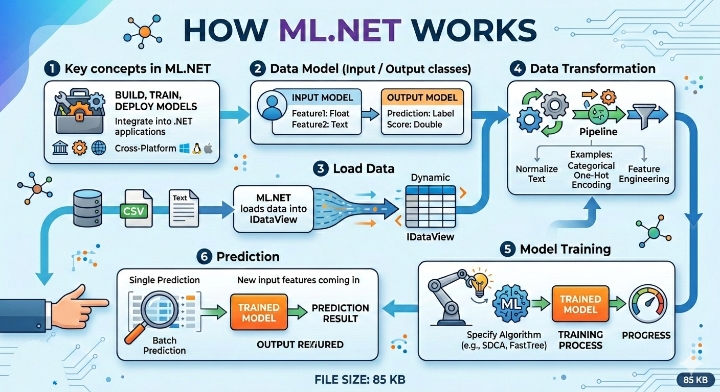
Data → Load → Transform → Train → Evaluate → Predict
Detail flow here
Raw Data (CSV, DB, JSON)
        ↓
Data Loading (IDataView)
        ↓
Data Transformation
        ↓
Model Training (Trainer)
        ↓
Model Evaluation
        ↓
Model Save (.zip)
        ↓
Prediction Engine1.Key concepts in ML.NET
This is the main object used to access ML.NET functionality.
var mlContext = new MLContext();
Think of it like:
- DbContext in Entity Framework
- Application context for ML operations
2.Data Model (Input / Output classes)
public class InputData
{
    public float Size;
    public float Price;
}

public class Prediction
{
    public float Score;
}
3. Load DataML.NET loads data into IDataView.
IDataView data = mlContext.Data.LoadFromTextFile<InputData>(
    "data.csv",
    separatorChar: ',',
    hasHeader: true);
4. Data Transformation Convert raw data into ML-ready format.
var pipeline = mlContext.Transforms
    .Concatenate("Features", "Size")
    .Append(mlContext.Regression.Trainers.Sdca());
Size → Feature
5. Model Training
Train the model-: Train the model example
var model = pipeline.Fit(data);6. Prediction
Use trained model:
var predictor = mlContext.Model.CreatePredictionEngine<InputData, Prediction>(model);

var input = new InputData { Size = 1000 };

var result = predictor.Predict(input);

Console.WriteLine(result.Score);
outpoot of this example
Predicted Price: 250000
Complete Working Example in C#
House price prediction example
using Microsoft.ML;
using Microsoft.ML.Data;

public class HouseData
{
    public float Size;
    public float Price;
}

public class HousePrediction
{
    public float Score;
}

class Program
{
    static void Main()
    {
        var mlContext = new MLContext();

        var data = mlContext.Data.LoadFromTextFile<HouseData>(
            "house.csv", separatorChar: ',', hasHeader: true);

        var pipeline = mlContext.Transforms
            .Concatenate("Features", nameof(HouseData.Size))
            .Append(mlContext.Regression.Trainers.Sdca(
                labelColumnName: nameof(HouseData.Price)));

        var model = pipeline.Fit(data);

        var predictor = mlContext.Model.CreatePredictionEngine<HouseData, HousePrediction>(model);

        var input = new HouseData { Size = 1200 };

        var prediction = predictor.Predict(input);

        Console.WriteLine($"Predicted Price: {prediction.Score}");
    }
}
How ML.NET works internally (simplified)
Internally:
Your Data
   ↓
Converted to IDataView
   ↓
Feature Engineering
   ↓
Trainer Algorithm
   ↓
Mathematical Model Created
   ↓
Saved as ZIP file
   ↓
Loaded for prediction
The model contains:
- Weights
- Bias
- Transformation logic
Model Save and Load
Save model:
mlContext.Model.Save(model, data.Schema, "model.zip");
Load model:
var loadedModel = mlContext.Model.Load("model.zip", out var schema);
ML.NET Trainers Available
Examples:
Regression:
- SdcaRegression
- FastTree
- LightGbm
Classification:
- LogisticRegression
- FastTree
- SdcaMaximumEntropy
Clustering:
- KMeans
Advantages of ML.NET
1.Native C# support
2.No Python needed
3.Fast performance
4.Cross platform
5.Production ready
6.Easy integration
ML.NET vs Python ML
| Feature | ML.NET | Python |
|---|---|---|
| Language | C# | Python |
| Integration | Excellent for .NET | Harder in .NET |
| Performance | High | High |
| Ease for .NET dev | Excellent | Medium |
| Ecosystem | Growing | Very large |
Where ML.NET is commonly used
- ASP.NET AI features
- Enterprise software
- Microservices
- Desktop apps
- Real-time predictions
Summary (Simple Definition)
ML.NET is a machine learning framework for .NET that allows developers to:
- Train ML models in C#
- Use models inside .NET applications
- Make predictions without Python